
Your clique for every click.
Explore online with a little backup.
- Risk detection on every page.
- Guidance to tackle online tasks with ease.
- Access to secure human tech support.
Where MyCliq works
- Browser extensionBeta live
- Mobile appComing soon
- Desktop appComing soon
Stop a scam in its tracks.
When you ask for help through MyCliq, you see one thing and your helper sees another. Take the tour, one screen at a time.
Turn your phone sideways to see both screens side by side, the way Margaret sees them.
Step 1 of 8
Her email is safe. This message isn’t.
MyCliq shows Margaret’s email is one of her saved sites. Then a message says her bank account is on hold, and her cursor drifts to Verify now.
 What Margaret sees
Dear customer,
We noticed unusual activity on your account. Your account will be closed within 24 hours unless you verify your details now.
Verify nowRiverside Bank Security Team
lakeviewmail.comIt’s one of your saved sites, and MyCliq is still watching this tab.
Step 2 of 8
The link tries to load. MyCliq pauses it.
She clicks Verify now. Before the look-alike page can load, MyCliq pauses it and shows her the real Riverside site. She goes back.
What Margaret sees
Verify your account to avoid closure
This looks like it could be a risky site.Nothing has happened yet.
Step 3 of 8
She asks for help, right where she is.
Back on the real Riverside site, Margaret isn’t sure about something on her statement. She taps Loop in, without leaving the page.
What Margaret sees
Checking account
Choose one person below. They’ll see this page with you, and nothing else.
 Sarah Alvarez
 Stephen Ellis
 Emma Alvarez
 MyCliq live support
Step 4 of 8
She checks who, and how.
Before anyone joins, MyCliq shows who she’s sharing with, and that her passwords and account numbers stay hidden.
What Margaret sees
Checking account
Sarah AlvarezYour daughterAvailable nowChangeHow you’re sharingLive callSarah sees this page with you, right now.ChangeYour passwords and account numbers stay hidden, and you can stop at any moment.Call Sarah nowStep 5 of 8
Sarah joins. Margaret says when.
Sarah accepts from her phone. Sharing starts only when Margaret taps Start sharing my page.
What Margaret sees
Checking account
Sarah AlvarezOn the line, waiting for youMyCliq AssistantSarah is on the line, but she cannot see your page yet. Sharing starts when you tap the button below.Even while sharing, Sarah can’tSee your passwords or credentialsSee account numbers or balancesClick or type on your screenStart sharing my pageSend a snapshot insteadA single picture, with no live call.Step 6 of 8
Margaret sees her whole page.
She sees her statement as usual, with Sarah’s pointer and live captions of what Sarah says.
What Margaret sees
Checking account
Sarah Alvarez2:14Seeing this pageLive captionsOnSarahHi Mom. I can see the page you’re on.YouWhich number is what I have left?SarahEnding balance, on the right. I can’t see the amount. Only you can.Listening…My microphoneOnSharing my pageOnEnd the callSharing stops right away.Step 7 of 8
Sarah sees much less.
The same page, with the account number and balances hidden. Sarah can talk and point. She can’t click or type.
What Sarah sees
Checking account
Sarah asked. Margaret decides.
Margaret2:14 · on a callSeeing her pageLive captionsMargaretWhich number is what I have left?YouEnding balance, on the right. I can’t see the amount. Only you can.You can talk and point. You cannot click or type on her screen.Leave the callMargaret stays on her page.Step 8 of 8
It ends with something to keep.
Margaret stops sharing and Sarah’s view closes at once. She can save the steps as a how-to, or let it go.
What Margaret sees
Checking account
Which one sounds like you?

“I want a pause before a known scam page.”
When you're about to open a page that's on MyCliq's list of known scam sites, MyCliq pauses it and asks you to take a second look first. You can report a scam page so the next person gets the same pause, and get help drafting an FTC report that you read and send yourself.
Help that leaves something behind.
Every how-to Margaret saves lives in her MyCliq library. Follow one from start to finish.
Turn your phone sideways to see her screen the way Margaret sees it.
Step 1 of 8
Her bank opens. Her how-tos are already there.
Margaret goes to riversidebank.com. It’s one of her saved sites, so the how-tos saved for it pop up in her panel. No searching.
What Margaret sees
riversidebank.comStep 2 of 8
She picks the one she needs.
She taps Find last month’s statement, saved with Sarah. MyCliq shows the four steps in plain words first.
What Margaret sees
Step 3 of 8
One step at a time, on the real page.
The panel shows just the first step. On the page, the thing to tap is outlined in violet, so she never has to hunt for it.
What Margaret sees
Step 4 of 8
The next step waits for her.
She taps Done when she’s ready. Nothing moves on by itself, and Show me again repeats the step.
What Margaret sees
Step 5 of 8
Plain words, not bank words.
Every step says what to tap and where it is. If a word is new, she can ask the Assistant what it means.
What Margaret sees
Step 6 of 8
The last tap.
One more step and the statement opens right on the page. If she gets stuck anywhere, she can loop in Sarah.
What Margaret sees
Step 7 of 8
She did it on her own.
The statement is open, and MyCliq offers to read it through with her. Next month, the same how-to will be waiting.
What Margaret sees
Step 8 of 8
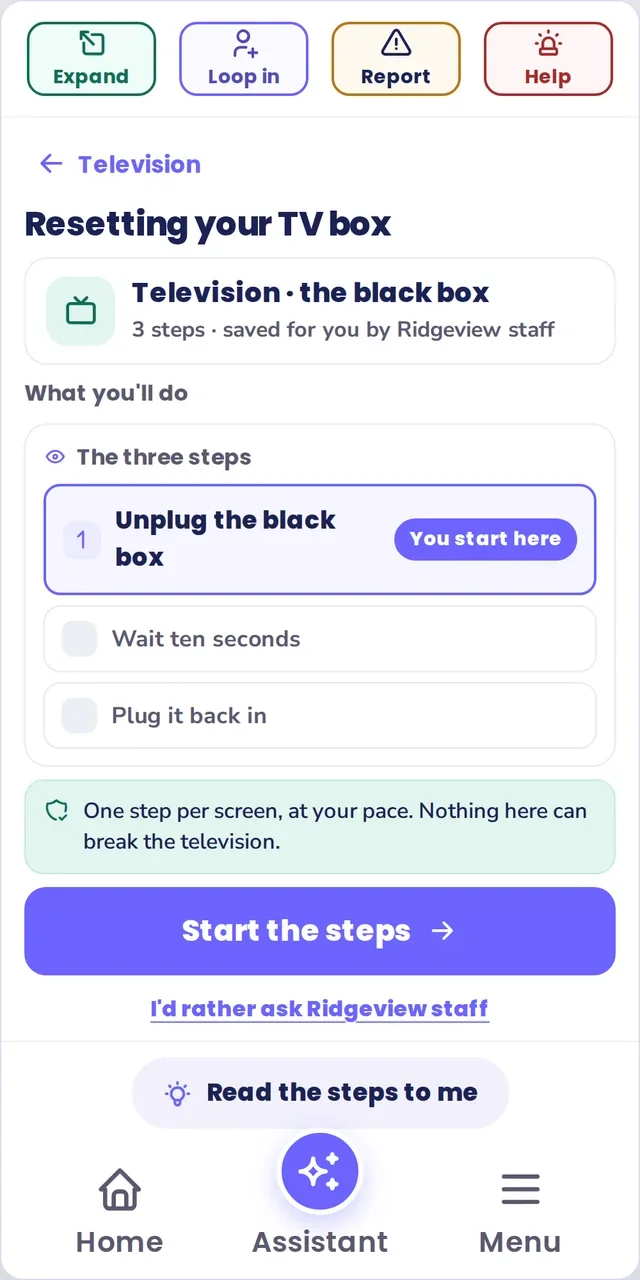
And for the TV, the Wi-Fi, the thermostat.
“Resetting your TV box” is three steps, saved for her by staff at Ridgeview. It’s in her library under Television, ready on her phone or tablet.
Find the part that fits you.
- For familiesSix people, six plans, and nobody has to be the hub. See how each yes stays separate.See family access
- Tech supportA real person from MyCliq support, who sees only what you choose to share.See a session
- Memory pilotA calmer, safer browser for adults living with memory loss, cognitive changes or dementia.About the pilot
- For partnersHelp your residents, members, or clients online, with every assist logged, at the desk or on the go.Senior communities